
ToyMaker Game Engine (2023 onwards)
ToyMaker is an open source, extensible, single-threaded 3D game engine written in C++ on top of SDL3 and OpenGL.
In ToyMaker, scene data is described in JSON and managed through a combination of ECS and scene tree APIs. Demo projects using ToyMaker have been compiled successfully for Windows and Linux.


Examples/FillContainer – shows spheres spawning at a steady rate filling an invisible
container, with several collision checks and corrections taking place every frame.
Examples/TriplePendulum – shows set of granular single degree of freedom position
constraints being used to model the behaviour of a hinge joint in a triple pendulum.

Examples/SlopeFriction – demos friction forces causing a moving block to slow and come
to a stop sliding down a gentle incline.

Examples/ManyLights – scene containing 441 point lights and 441 models (2 meshes each)
rendered with instancing for both.

Examples/LeftRightCollision – shows single one-to-one collision between two spheres.

Examples/UILayout – shows UI elements being dynamically repositioned in response to window resizing.

Examples/CenterText – demo featuring clickable text that spins on interaction.
Technologies
- Programming Languages: C++, GLSL
- Tools: CMake, Doxygen Clang, mingw-w64, RenderDoc
- Libraries: SDL, SDL Image, SDL TTF, SDL Mixer, GLEW, Nlohmann JSON, GLM, Assimp
History
ToyMaker started out as a personal learning project in 2023, when I began studying OpenGL and learning graphics programming. It was undifferentiated from Game of Ur until 2026, when it was moved into its own respository. ToyMaker’s commit state history leading up to the division may be browsed on this Game of Ur tag.
Architecture
Entity-Component-System (ECS)
ToyMaker is built on top of an ECS system that exists side-by-side with its scene system. Scene data, such as transforms, object bounds (or colliders), physics state, etc., are stored as simple (or as close as possible) plain-old-data types, in tightly packed component arrays. Each component instance is additionally tagged with the entity ID of its owning object. The set of all components across all arrays marked with a specific entity ID describe a single object in the scene that the ID names.
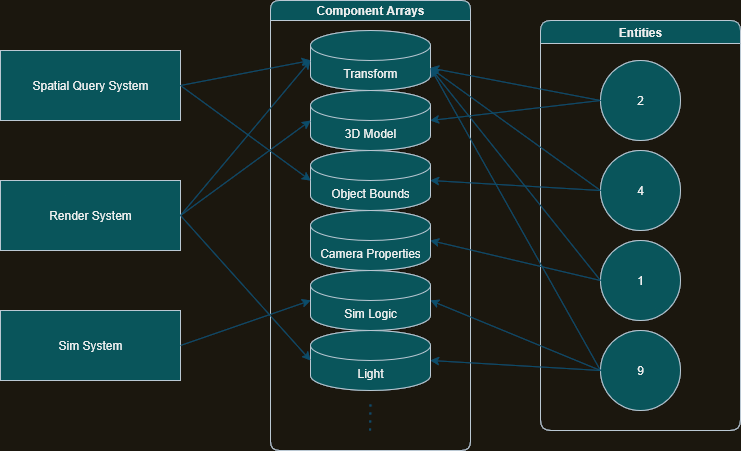
ECS systems (derived from ToyMaker::System) roughly represent the various ways in which scene data is mutated over an application’s lifetime. Each system tends to access no more than a handful of components for each entity (e.g., the render system mainly deals with transforms and models, while the physics system cares primarily about object bounds and physics state), and declares which components these are. Components named by these systems end up becoming ECS components.
Keeping component data in tightly packed arrays, coupled with the fact that any single system only requires data from a handful arrays at most, leads to significant performance gains owing to cache locality. For convenience, however, the ECS::Entity class provides an interface for accessing object data in a near object-oriented fashion.
Resource Database
Static resources, i.e., reusable resources which aren’t likely to change over the runtime of an application, are tabulated, serialized/deserialized, and provided shared access to through ToyMaker::ResourceDatabase. Examples of data of this kind include 3D models, images/textures, sounds, and even shader programs.
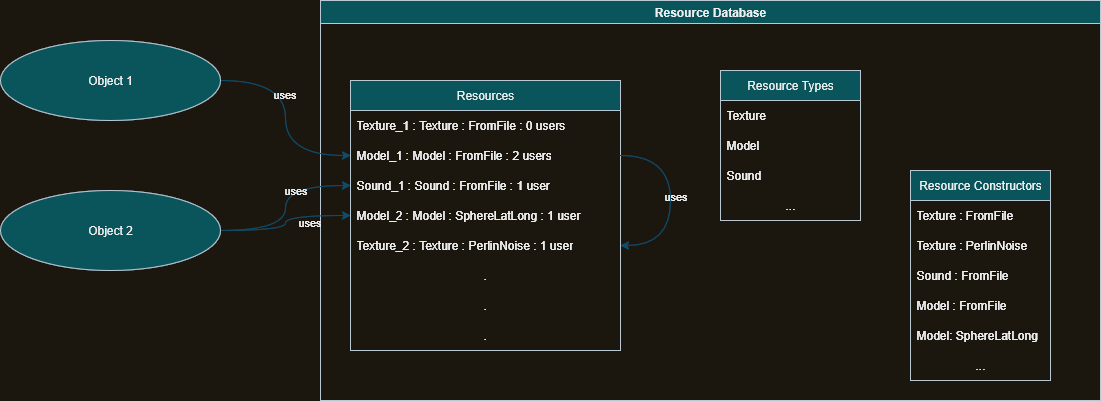
Each resource may be constructed in a variety of ways; models, for example, may be generated procedurally, or loaded into memory from a file. Accordingly, each resource, inheriting from ToyMaker::Resource, may be associated with several resource constructors.
The resource database is a global object that shares references to named resources already in memory, or otherwise constructs that resource according to its user-provided description, where the description is usually registered with the database at the start of the application.
Update loop
ToyMaker’s update loop is broadly split into 3 distinct steps:
-
The fixed update: This is where logic that ought to be independent of the speed of the underlying hardware goes. ToyMaker’s Physics system lives here, mostly. The size of a single fixed-step is configurable. How often this runs relative to the variable update depends on a number of factors, including user hardware, and the number of simultaneously running applications.
-
The variable update: This is where logic that is less sensitive to time goes. Typically, scripts will receive input and set input related parameters from here. Updates related to game visuals, that don’t depend on a reliable simulation, often also go here.
-
The render update: This is where ToyMaker’s render system will use scene data and render it to a 2D image to be displayed to the user. How often this runs once again depends on user hardware, application configuration, and the current state of the user’s machine.
Scene System
ToyMaker’s scene system provides a logically hierarchical representation of the scene. It is comprised of a number of scene nodes, inheriting from ToyMaker::SceneNodeCore where each node holds a weak reference to its parent, and strong references to its children.
Usually, each child node will apply its local transform after its parent has applied its global transform in order to obtain the node’s final position, orientation, and scale. The combination of the current node’s local transform and its parent’s world transform becomes the current node’s world transform.
From the point of view of the resource database, a scene is merely another type of resource that can be constructed either through its description, or loaded from a scene file.
Viewports
The scene may also have viewport nodes. A viewport node, along with its associated camera, provide a rendering target for a single ECS world. Multiple viewport nodes can be associated with one ECS world, potentially showing the state of the world with different perspectives and rendering configurations. Alternatively, a viewport node may opt to own its own ECS world, marking the boundary between its parent’s world and its own.
A viewport node with its own ECS world is useful for a number of things, including making a UI overlay over a 3D scene, or making a game-in-game style feature. A viewport node that shares its world with its parent can be used to implement interesting features, like reflections, FPS scopes with a different FOV from the regular first-person camera, or a split-screen for local multiplayer.
Aspects & Sim Objects
Quite often it is the case that developers would like to define behaviour directly on top of the object that should exhibit that behaviour – as opposed to fiddling with the constraints and indirectness of ECS systems. For that purpose, ToyMaker provides a component-based scripting interface, that it calls sim objects and aspects.
An aspect is a user-defined script – similar to a MonoBehaviors from Unity, or scripts in Godot – that are hooked into application loop events, and that provide full access to the components of the scene node that owns it. It also provides methods for querying scene nodes relative to the one it’s attached to.
A sim object is simply a special subclass of scene node that is capable of hosting one or more aspects. It is also the only scene node class eligible to be the root of a scene described by a scene file or scene description.
Rendering System
The render system is responsible for actually displaying the scenes ToyMaker manages. It does so by periodically reading scene data and turning it into images through a combination of various techniques.
The render system is divided into render sets – a set of target color and depth-stencil buffers allocated for a single viewport – and some sequence of render stages. Each render stage represents a combination of CPU and GPU work, resulting in the addition of a specific effect to a target image, or the creation of a certain resource that is intended to be used with the target image.
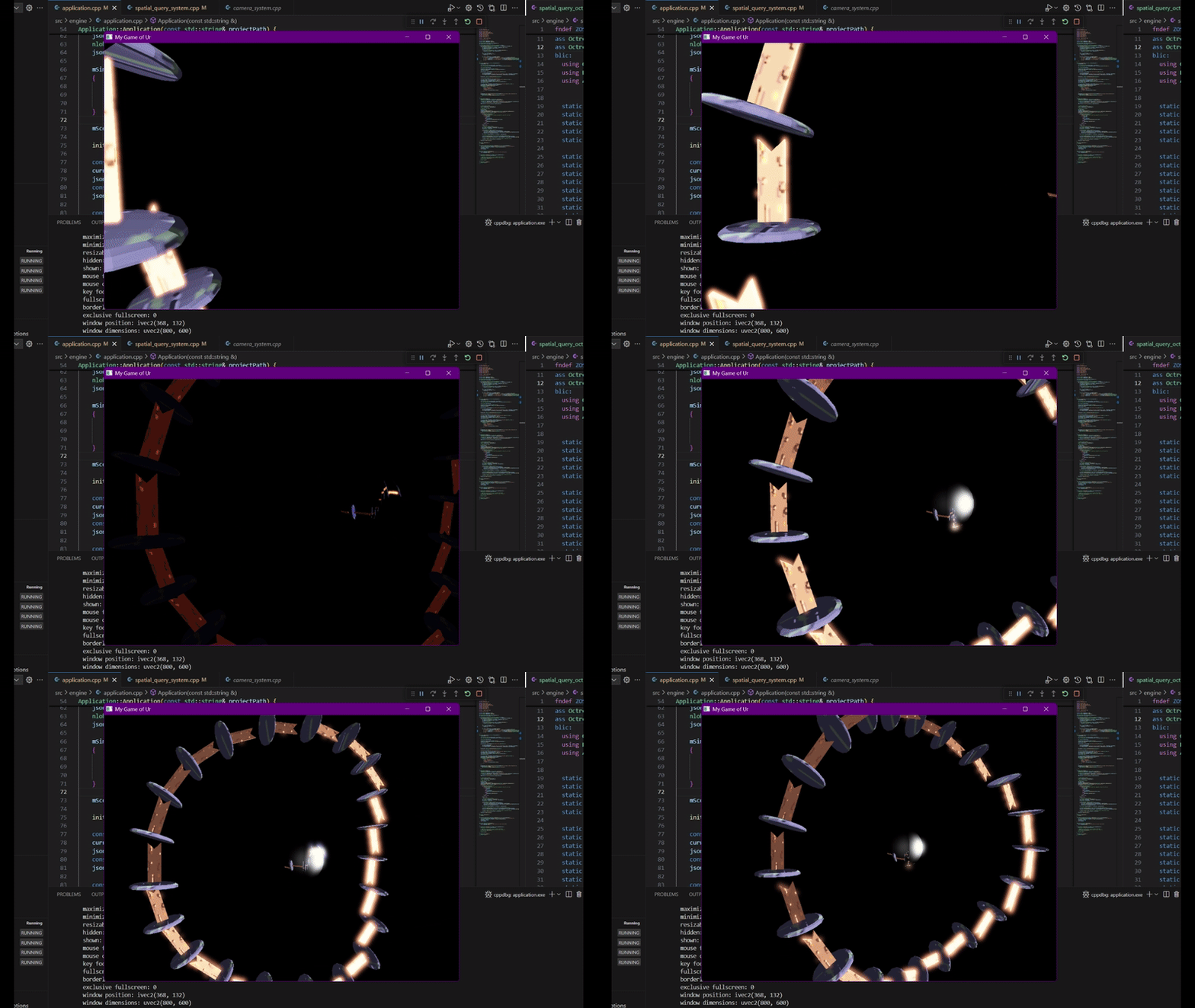
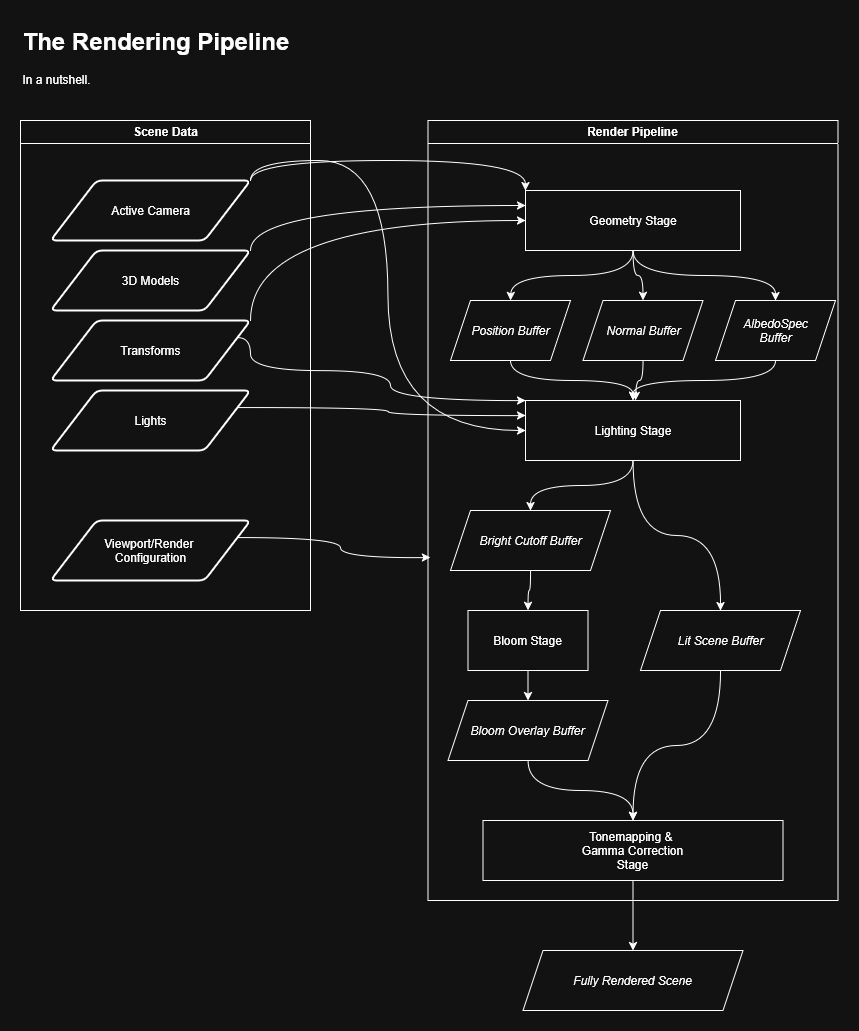
At present, each render stage is associated with a single OpenGL shader program, and the only rendering pipeline supported by ToyMaker is a 3D Blinn-Phong deferred shading pipeline with the following stages:
- ToyMaker::GeometryRenderStage – Converts input mesh-material pairs into albedo, specular, and position textures, collectively called geometry textures.
- ToyMaker::LightingRenderStage – Uses geometry textures and light data to produce a texture of the lit scene.
- ToyMaker::SkyboxRenderStage – Adds a cubemap background to the lit scene.
- ToyMaker::TonemappingRenderStage – Applies gamma correction and camera exposure post-processing effects to the lit scene.
Physics & spatial query systems
The physics system is responsible for simulating physics for appropriately tagged entities in the scene. It does so through an implementation of XPBD, or Extended Position-Based Dynamics.
Each entity managed by the physics system possesses physics state, and object bounds. Every fixed step, the physics system predicts where each object should end up next:
-
Using the sum of forces acting on the center of mass of the object, compute the change to its velocity, and add it to the object’s previous velocity to find its new velocity.
-
Using the sum of torques acting on the object, compute the change to its angular velocity, and add the change to its previous angular velocity to find its new angular velocity.
-
Using the velocity of the object, compute and apply the change to the object’s position in this timestep.
-
Using the angular velocity of the object, compute and apply the change to the object’s orientation in this timestep.
Then, the physics system corrects all violations of applicable physical constraints:
-
Get the collision response data for a pair of intersecting objects.
-
Compute the generalized inverse mass for each object.
-
Use collision data to compute a Lagrange multiplier delta.
-
Use the Lagrange multiplier delta to compute a positional correction impulse.
-
Apply the correction impulse (in opposing directions) to both objects.
-
Derive the new velocities of each object.
… where a constraint is anything from a collision, to a joint between two objects, to an implied spring connecting two objects.
This update is performed one or more times every fixed update, where the fixed update itself takes place 10s of times each second per the application configuration. Optionally, the system can use signals to report collision events to scripts and other systems. Collisions are resolved using GJK, with sweep and prune used to minimize the number of times GJK is required to run.
ToyMaker’s spatial query system provides an interface for answering most spatial queries; for example, what is the closest object to this object? Do these two objects intersect? What objects exist within a given region? And so on. It does so through a dynamic Octree implementation.
Inputs
ToyMaker’s input system translates raw input from the platform running the application into actions, which are abstracted normalized inputs directly consumable by systems and scripts. The input configuration informs the application which raw inputs map to which actions. It tends too look something like:
   W    ______
 A|S|D        \___.--> Character : Move (2 Axes) --> (Move handlers)
<keyboard>     /
              /
             /
 (( L ))----/
<controller>
Window context
For the time being, the window context is a simple wrapper over SDL that requests a window from the operating system, initializes the OpenGL context, performs initialization for other libraries ToyMaker depends on, and reports window level changes to scripts and systems managed by the ToyMaker engine.
Signals
This is a two-part lightweight implementation of the observer pattern, enabling the decoupling of signal publishers from its consumers in the engine environment. An object will either play the role of a signal publisher, broadcasting the fact that some specific event took place, or the role of a signal observer, which takes some action when such an event occurs. Any single object often plays both roles, advertising its signals to other objects, and listening for events from other objects, and this capability is represented as the signal tracker base class.
As to why this is necessary: a script that is responsible for applying damage in a game, for example, should not need to know that the damage should cause a sound to play, or for some metric to be updated. It should only do what it is intended to do, which is update health numbers, and leave further processing to systems subscribed to its signal.
References
-
ToyMaker Github repo – Where the game engine and its sources are hosted.
-
Game of Ur Github repo – A game built on top of the ToyMaker engine, playable on Windows and Linux.
-
Game and engine development timeline video – A development timeline video for the ToyMaker engine and the Game of Ur.
-
Engine documentation – The site holding everything I’ve written about the ToyMaker engine.
-
ToyMaker Trello board – Trello board for engine development. This is going to keep getting updates, albeit much more slowly than before.
-
Learn OpenGL – One stop shop for practically everything you need to know for starting graphics programming.
-
Euler angles and gimbal lock - A video demonstrating why euler angles are insufficent for representing changing orientations.
-
Model View Projection - J Santell – High level overview of what the most commonly used matrices in 3D rendering actually do.
-
The Perspective and Orthographic Projection Matrix – Talks about how the perspective projection matrix is actually derived.
-
Visualizing the 4d numbers Quaternions – Very cool video talking about what quaternions are, how their math works, and how they can be used to specify rotations in 3D.
-
Linear Algebra - Khan Academy – Best linear algebra learning material I’ve found online.
-
Beginning Game Programming v3.0 – This taught me SDL 3.
-
CMake Tutorial – A guide to perhaps the most ubiquitous build system for C++.
-
Makefile Tutorial – Used to create recipes for the creation of specific files that depend on some process being applied to other files.
-
Pro Git – Comprehensive manual for a very popular versioning tool.
-
Learn C++ – A series of lessons in the use of C++.
-
C++ Templates and Metaprogramming – Medium article talking about some common C++ template idioms.
-
Modern Template Metaprogramming – The first of a series of video talks about the power of C++’s generics.
-
Physics introduction - Godot Engine 4.7 documentation in English – An overview of physics data as represented in Godot, useful for learning how popular engines tackle this task.
-
Object/Object Intersections - realtimerendering.com – An extensive collection of links to intersection test techniques for different pairs of shapes.
-
Implementing GJK (2006) - Casey Muratori – Video lecture giving a simple breakdown of how GJK works, and how it can be implemented.
-
Computing Distance - Erin Catto – Slides that are presumably connected with a talk given at GDC, whose video I could not find. Covers everything from GJK’s rationale to its implementation in easy non-academic language, with plenty of diagrams.
-
Game Physics: Contact Generation (EPA) - Allen Chou – Article describing the Expanding Polytope Algorithm, or EPA, for finding collision contact points using the simplex found with GJK.
-
Detailed Rigid Body Simulation with Extended Position Based Dynamics - Matthias Müller, Miles Macklin, Nuttapong Chentanez, Stefan Jeschke, Tae-Yong Kim – The paper on the realtime physics simulation approach, XPBD, talked about in this article.
-
Ten Minute Physics - Matthias Müller – Collection of educational physics programming videos, many of them closely connected with the XPBD paper.
-
Impulse-Based Dynamic Simulation - Brian Mirtich – A paper on impulse-based physics solvers as seen in most current physics engines. The appendix contains a very useful collection of derivations for various 3D physics formulae.
-
Introduction to Octrees - Eric Nevala – An introduction to spatial partitioning algorithms in general, with a guide to building octrees in particular.
-
Advanced Octrees 3: non-static Octrees - David Geier – A very short article which talks about how to dynamically update the region encompassed by an octree in response to changes in a scene.
-
Sort, sweep, and prune: Collision detection - leanrada – An explanation of Sweep-and-Prune, a popular broad-phase collision detection algorithm.